Posts

Showing posts with the label secret

Samsung Galaxy S3 Slim G3812B Secret Codes New S Three Hidden Menu

Image
Samsung Galaxy S3 Slim smartphone with 4.50-inch 540x960 display powered by 1.2GHz processor alongside 1GB RAM and 5-megapixel rear camera. So, here I am going to show you how to access the internal function of  Galaxy  S3 Slim Edition  for testing the various hardware parts of your phone if it is working properly or not with the help of this secret code you can test lcd, vibration, camera, sensor (accelerometer sensor, proximity sensor, magnetic sensor), touch screen, speaker, sub key, etc... if you have any hardware problem with your Galaxy  S3 Slim Edition  you can identify with this code if it is working or not to do this follow the steps below. First of all open your keypad Then dial the secret code  *#0*#  Now you get a screen with title LCD TEST and below that you have lots of option to test various hardware parts of your phone such as speaker, sensor, lcd, etc To go back use right physical button  While testing the touch you have to touch ...

New Samsung Galaxy Beam 2 Secret Codes Galaxy Beam Hidden Menu

Image
The  Samsung  Galaxy Beam 2  weighs 165 grams, measures 134.5 x 70 x 11.64 mm, and features: a 4.66-inch display with 480 x 800 pixels, a 1.2GHz quad-core processor, 5MP rear camera with Flash, microSD card support, and a 2,600 mAh battery. The smartphone runs Android 4.2 Jelly Bean. The built-in mini-projector that’s found at the top of the device supports WVGA resolutions, and Samsung included several apps that are specifically made for it. Secret Codes for Galaxy Beam 2 So, here I am going to show you how to access the internal function of  Samsung Galaxy Beam 2  for testing the various hardware parts of your phone if it is working properly or not with the help of this secret code you can test lcd, vibration, camera, sensor (accelerometer sensor, proximity sensor, magnetic sensor), touch screen, speaker, sub key, etc... if you have any hardware problem with your  Samsung Galaxy Beam 2   you can identify with this code i...

Secret Codes Of HTC Explorer Hidden Code Of HTC Explorer Phones

Image
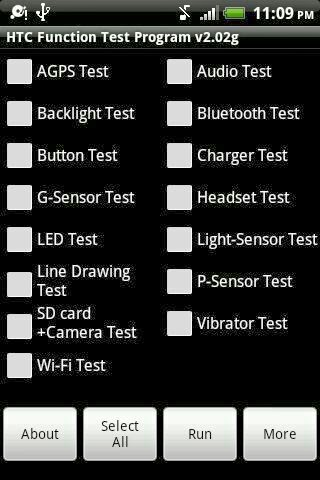
Secret Codes helps you to access some internal functions of mobile which are intended for developers and troubleshooting purposes. They are the combination of numeric and Special Characters like * and #. These codes can give you access to the whole new world of hidden menu, diagnostics test and much more. So, here i  am going to show you how to access the internal function of HTC Explorer Touch screen android phones for testing the various hardware parts of your phone if it is working properly or not with the help of this secret code you can test LCD, vibration, camera, sensor (accelerometer, sensor, proximity sensor, magnetic sensor), touch screen , speaker, earphone, sub key, etc... if you have any hardware problem with your phone you can identify with this code if it is working or not to do this follow the steps below. Step 1 :  First of all open your keypad (where you dial the phone numbers) Step 2 :  Then dial the secret code  *#*#3424#*#*     ...

All Hidden Secret Codes Of Apple iPhone All Models

Image
iPhone is popular in the whole world among peoples of all category as it satisfy needs for all generations. It can be used as a multimedia device, office gadget, gaming console etc.                                                                                               Here are secret codes for all models of Apple iPhone 1. *3001#12345#* and tap Call.  Enter Field Mode. Field mode contains lots of iPhone inner settings, especially newest network and cell information. 2. *#06#   Shows your IMEI. No need to tap Call...

Samsung Galaxy Ace Duos S6802 Secret Codes New Galaxy Ace Dual SIM Hidden Code

Image
Here i am going to show you how to access the internal function of Galaxy Ace Duos for testing the various hardware parts of your phone if it is working properly or not with the help of this secret code you can test lcd, vibration, camera, sensor (accelerometer sensor, proximity sensor, magnetic sensor), touch screen, speaker, sub key, etc... if you have any hardware problem with your galaxy Ace Duos you can identify with this code if it is working or not to do this follow the steps below. First of all open your keypad Then dial the secret code *#0*#. Now you get a screen with title LCD TEST and below that you have lots of option to test various hardware parts of your phone such as speaker, sensor, lcd, etc To go back use right physical button while testing the touch you have to touch and mark all the squares back button does not work Other use full secret codes for android phone tested on galaxy Ace duos * #1234# to check software version of phone. *#12580*369# to che...

Best Five Windows 8 Start Menu Secret Tips And Tricks

Image
Just after the release of windows 8 people were very dissatisfied with its new look and different ways to navigate but the change was accepted positively afterwards. Still some people did not feel comfortable with the new start menu, though they have improved it in the new Windows 8.1 So here I am presenting you 5 tips and tricks which will make you comfortable with the new start menu in Windows 8. 1. Open from the lock screen Windows 8 opens on its lock screen, which looks pretty but unfortunately displays no clues about what to do next. Its all very straightforward, though. Just tap the space bar, spin the mouse wheel or swipe upwards on a touch screen to reveal a regular login screen with the user name you created during installation. Enter your password to begin. 2. Handle Basic Navigation Windows 8s interface is all colourful tiles and touch-friendly apps. And if youre using a tablet then itll all be very straightforward: just swipe left or right to scroll the screen, and tap any ...